INSIDE BROPOS

A closer look at
smoother service.

Explore the screens behind your daily operations. From the counter to the floor, see how your team can work with BroPOS.

One POS. Different ways to work.

Mobile POS / PRODUCT PREVIEW

Take service beyond the counter.

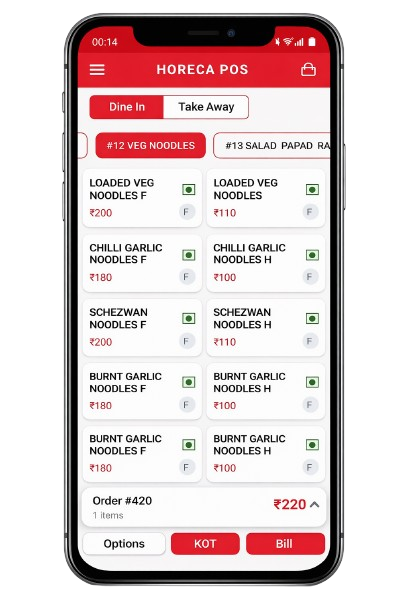
Browse menu categories, select items, and keep the current order close at hand on a mobile screen.

  • Dine-in and takeaway options
  • Item prices and variations in view
  • Quick access to KOT and billing
BroPOS mobile POS showing dine-in and takeaway options, menu items and prices, and order, KOT, and bill controls
Mobile POS · Product screenshot
A CLEARER VIEW OF THE DAY

Less searching.
More getting things done.

See the kinds of information your team can keep in view throughout service.

01 / ORDERS

Keep the floor in focus.

Follow dine-in, takeaway, and delivery orders with a clear view of what’s happening.

Order overviewIllustrative example
Table 12Dine-in · #1042Cooking
Takeaway 18Takeaway · #1043Ready
Delivery 06Delivery · #1044Received
02 / KITCHEN

Make each handoff clearer.

Keep item details, preparation notes, and order status together for the kitchen team.

Kitchen ticketIllustrative example
#1042 · Table 12Cooking

1 × Paneer tikka

2 × Butter naan

Guest note: less spicy
03 / MENU

Know what’s on the menu.

Keep item availability visible so the floor and kitchen stay on the same page.

Menu availabilityIllustrative example
Paneer bowlAvailable
Berry shakeUnavailable
Hot coffeeAvailable
GO BEYOND THE SCREENSHOTS

See your service in BroPOS.

Walk through orders, menus, and billing with a guided demo.

Mobile POS

Product screenshot

BroPOS mobile POS showing dine-in and takeaway options, menu items and prices, and order, KOT, and bill controls