01 / ORDERS & BILLING
Keep the counter moving.
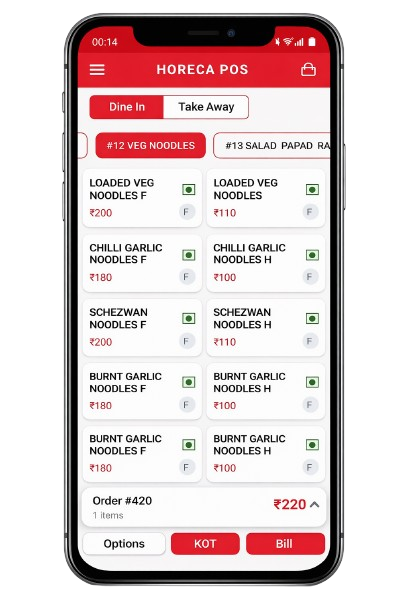
Manage dine-in, takeaway, and delivery orders, then bring items, discounts, and charges into a clear bill.
- Order management
- Cash, card & UPI
Your restaurant POS, right in your hand. Take orders, manage menus, and handle billing from the floor, with desktop POS for your counter too.
A workspace for your teamOrders, menus, and billing together
Connected through serviceFrom first order to final payment
A clearer view of businessDaily operations and sales insights

Keep your mobile app at the heart of service, with a desktop workspace for tables, orders, and billing at the counter.
Explore both screensGive your team clear tools for each part of the day, without losing sight of the whole business.
Explore all featuresManage dine-in, takeaway, and delivery orders, then bring items, discounts, and charges into a clear bill.
Send orders with item notes and modifiers so the floor and kitchen can stay on the same page.
Update items, categories, prices, and variations. Keep availability visible as service changes.
Follow sales, item performance, and daily operations from your manager dashboard, wherever you work.
Keep order details moving with your team, through each handoff of service.
See how it worksCapture items, preferences, and table details from your POS.
Keep preparation notes and order status connected across the team.
Close the order, record payment, and follow your sales.
Explore a setup that fits your food business, from a single outlet to a growing operation.
Find your planYes. Arrange a demo to walk through the product and discuss your restaurant’s workflow. You can also explore the product screens here.
BroPOS supports smartphones, tablets, and desktop POS terminals. Talk to our team about the devices you plan to use.
Starter is designed for a single outlet. Business covers up to five outlets, while Enterprise offers a tailored setup for larger operations. Compare the plans or discuss your needs with our team.
Get a closer look at BroPOS with a demo built around your day.